
Phone Speaker Crackling: Why It Happens and How to Fix It
Phone Speaker Crackling
Quick Answer: A crackling phone speaker is a symptom, not a permanent diagnosis. It most commonly stems from loose dust or lint trapped in the grille, residual moisture clinging to the acoustic mesh after water exposure, volume clipping from software equalizers, or unintended Bluetooth audio routing. Before assuming hardware failure, lower your volume to 50%, disconnect Bluetooth, remove your case, inspect the speaker port under light, and test multiple audio apps. If the phone was recently wet, allow it to dry completely; if crackling persists across all media at moderate volume, perform a diagnostic Speaker Test to evaluate driver health.
Is your phone speaker crackling, buzzing, popping, or sounding distorted during calls and media playback? Before panicking about expensive repair bills, eliminate the simple environmental and software causes first. If you suspect foreign particles are trapped in the mesh, review our guide on how to clean dust from your phone speaker. If your phone recently encountered liquid, prioritize safe drying protocols before repeatedly running audio tests.
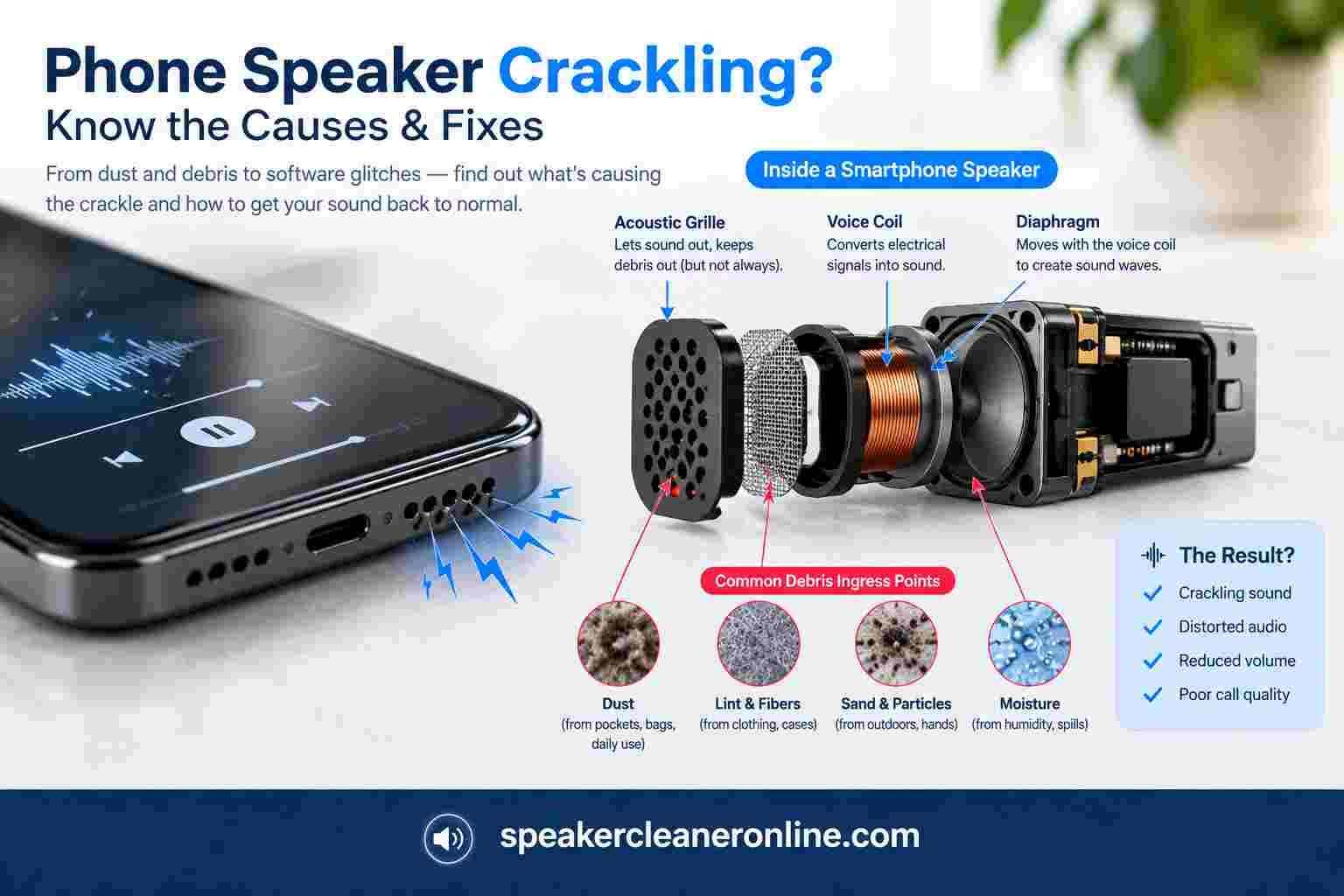
Why Is My Phone Speaker Crackling?
Smartphone micro-speakers are marvels of miniature engineering. A flexible diaphragm (cone) attached to a copper voice coil is suspended within a magnetic field. When electrical audio signals pulse through the coil, the diaphragm oscillates thousands of times per second, producing air pressure waves that our ears perceive as sound.
A phone speaker crackles whenever physical interference restricts this diaphragm from moving cleanly, or when the incoming electrical audio signal exceeds the physical limits of the amplifier. The most frequent causes include:
- Trapped moisture or liquid film: Water droplets bridging the acoustic grille mesh, forcing sound through a fluid barrier.
- Dry dust, pocket lint, or debris: Compacted particles resting against the speaker membrane, causing physical friction during loud excursions.
- Audio clipping and maximum volume: Pushing miniature amplifiers beyond their linear range, resulting in harmonic distortion.
- Equalizer (EQ) distortion: Extreme bass-boost presets overwhelming small phone transducers.
- Active Bluetooth audio routing: A weak or desynced wireless connection routing static-heavy audio through connected accessories.
- Damaged voice coil or torn surround: Physical degradation caused by hard drops or prolonged excessive playback volume.
- Corrosion from contaminated liquids: Dried mineral residues from salt water, soda, or pool water shorting electrical contacts.
First: Determine When the Crackling Happens
The exact circumstances under which your phone speaker crackles provide crucial diagnostic clues. Match your symptoms against the diagnostic matrix below before changing any device settings:
| What You Notice | Likely Root Cause | Immediate Recommended Action |
|---|---|---|
| Crackles only near 100% volume | Volume clipping, amplifier limits, or EQ boost | Lower volume to 60–70% and disable software bass enhancers. |
| Crackles in every app at any volume | Blocked grille, torn speaker diaphragm, or hardware fault | Inspect grille under light; run a structured speaker test. |
| Crackles in only one specific app or video | Corrupted audio file, bad stream, or app-specific bug | Play a local system ringtone or voice memo to rule out hardware. |
| Started immediately after water exposure | Water droplet surface tension on speaker mesh | Follow liquid drying steps; do not charge while wet. |
| Started immediately after a hard drop | Physical coil separation or torn suspension frame | Inspect for chassis cracks; requires physical repair. |
| Only cellular phone calls crackle | Top earpiece receiver issue or network carrier static | Switch to speakerphone mode to compare the bottom loudspeaker. |
| Crackling stops when Bluetooth is toggled off | Wireless interference or accessory handoff glitch | Disconnect smartwatches, car audio, or wireless earbuds. |
7 Ways to Fix a Crackling Phone Speaker
Work through these verified troubleshooting steps from least invasive to hardware checks:
1. Lower the Volume and Eliminate Clipping
Smartphone speakers are driven by tiny integrated micro-amplifiers. When audio tracks are mastered aggressively loud, pushing your volume slider to 100% forces the amplifier into digital clipping. The top of the sound wave flattens out, driving the voice coil harshly and producing a sharp crackling or buzzing sound. Lower your volume to 50–60% and listen again. If the audio sounds pristine at moderate levels, your speaker is physically intact.
2. Disconnect Bluetooth and Audio Accessories
Samsung's official audio troubleshooting specifically recommends disabling Bluetooth when diagnosing speaker defects [2]. Modern operating systems constantly manage handoffs between cars, smartwatches, hearing aids, and wireless earbuds. A partial or degraded Bluetooth connection can cause packet dropouts that sound remarkably like speaker static. Turn off Bluetooth in your quick settings, then play local audio through the built-in speaker.
3. Remove the Protective Case and Inspect the Grille
Thick protective cases and aftermarket screen protectors often shift over time, partially covering the bottom speaker ports or the microscopic slit of the top earpiece receiver. Sound waves bouncing off misaligned plastic edges create mechanical buzzing that mimics a blown speaker.
Remove the case and examine the speaker openings under bright direct lighting. If you see accumulated lint or compacted dust, review our tutorial on how to clean dust from your phone speaker. Apple recommends using a clean, dry, soft-bristled brush to gently remove dry surface debris without pushing objects into the grille holes [1].
Safety Warning: Never Use Pins or Needles on Speaker Holes
Never insert safety pins, toothpicks, sewing needles, or metal paperclips into speaker holes. Directly behind that outer perforated grille sits a water-resistant acoustic mesh and the delicate synthetic diaphragm of the speaker driver. Puncturing this layer ruins water resistance and permanently tears the speaker cone.
4. Test Multiple Independent Audio Sources
A compressed social media video, a low-bitrate voice note, or a poorly recorded podcast often contains baked-in distortion. To isolate whether your hardware is responsible, test three distinct sound sources at 50% volume:
- A native system ringtone or alarm sound (stored uncompressed on device storage).
- A high-bitrate song played from a streaming service (e.g., Apple Music or Spotify).
- A cellular call switched between the top earpiece receiver and bottom speakerphone.
If only one specific app or recording crackles, your speaker hardware is completely healthy.
5. Disable Audio Enhancers and Equalizer Presets
Aggressive software equalization can easily overload tiny mobile transducers. Check and reset the following settings:
- iPhone: Go to Settings > Music > EQ and select Off. Check Settings > Accessibility > Audio/Visual and verify Headphone Accommodations or custom balance sliders are centered.
- Android / Samsung: Navigate to Settings > Sounds and vibration > Sound quality and effects. Turn off Dolby Atmos, disable third-party equalizers, and set the system EQ profile to Normal (Flat).
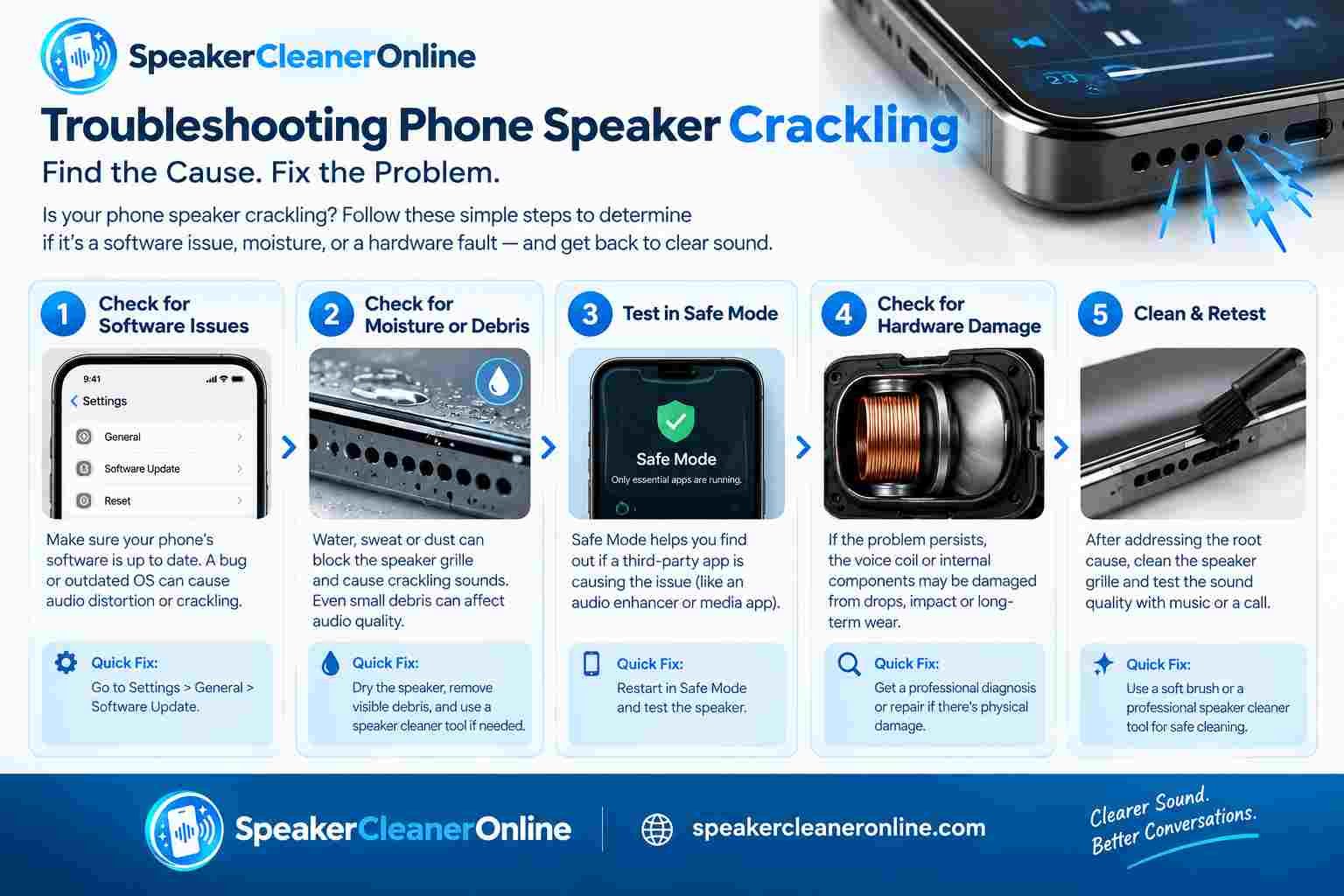
6. If the Phone Got Wet, Dry Thoroughly Before Testing
Water exposure alters speaker acoustics dramatically. Liquid droplets sitting across the fine mesh create surface tension that muffles vocal tones and creates buzzing static as air tries to pass through the liquid barrier.
- Immediately unplug all charging cables and accessories. Never charge a phone while moisture is present.
- Wipe the phone exterior with a clean microfiber cloth.
- Hold the phone upright with the speaker openings pointed downward and gently tap it against your palm to dislodge standing droplets.
- Leave the phone in a dry area with natural ambient airflow for at least 24 hours. Google and Apple specifically warn against applying external heat (hair dryers) or blasting compressed air [1, 3].
7. Restart Your Phone and Clear System Cache
Operating system audio daemons (such as coreaudiod on iOS or the AudioFlinger service on Android) occasionally develop buffer overruns or memory leaks after major firmware updates. A simple restart forces the operating system to reinitialize audio drivers and clear stalled audio cache files.
Can a Water Eject Sound Fix a Crackling Phone Speaker?
Yes, but strictly under specific physical conditions. If your phone speaker began crackling immediately following rain, a splash, or brief water exposure, an acoustic water-ejection routine can be remarkably effective at clearing trapped fluid.
Here is how it works mechanically: a dedicated audio tool synthesizes a low-frequency sound wave that commands the speaker's voice coil to cycle through rapid, high-displacement strokes. This rapid piston-like motion creates localized air pressure pulses inside the speaker chamber, shattering the surface tension of water droplets clinging to the grille mesh and pumping them outward.
Did Your Speaker Crackle After Water Exposure?
If your phone is dry but the speaker crackles from residual moisture trapped in the grille, run our free browser-based water ejection sound tool to dislodge droplets.
However, it is crucial to recognize the hard limits of acoustic cleaning:
- Sound cannot dry circuit boards: A speaker tone only affects the air directly in front of the speaker cone; it cannot dry a flooded motherboard or battery compartment.
- Sound cannot repair torn diaphragms: If a voice coil is physically warped or separated from the cone, sound sweeps will only accentuate the distortion.
- Sound cannot remove corrosive residues: If your phone fell into salt water, pool water, or soda, dried chemical crystals will remain behind after the water evaporates, requiring professional ultrasonic cleaning.
What Frequency Should You Use for a Crackling Speaker?
Many internet forums and viral videos insist that exactly 165 Hz is a scientifically proven frequency that repairs speaker distortion. This claim is a myth.
165 Hz is merely a widely used benchmark preset because it sits in a low-bass frequency band where phone micro-transducers produce substantial cone excursion without overheating the voice coil. However, acoustic dimensions differ wildly across manufacturers:
- An iPhone bottom speaker has different resonant properties than an earpiece receiver.
- Samsung Galaxy and Google Pixel phones feature distinct acoustic chamber dampening.
- Compact flip phones use micro-speakers with much higher natural resonant peaks.
Rather than locking onto a single tone, effective diagnostic tools utilize dynamic low-frequency sweeps (ranging from 100 Hz to 250 Hz). Sweeping across a band exercises the driver across its full operational curve, ensuring that you hit the exact mechanical resonance frequency of your phone's specific speaker design.
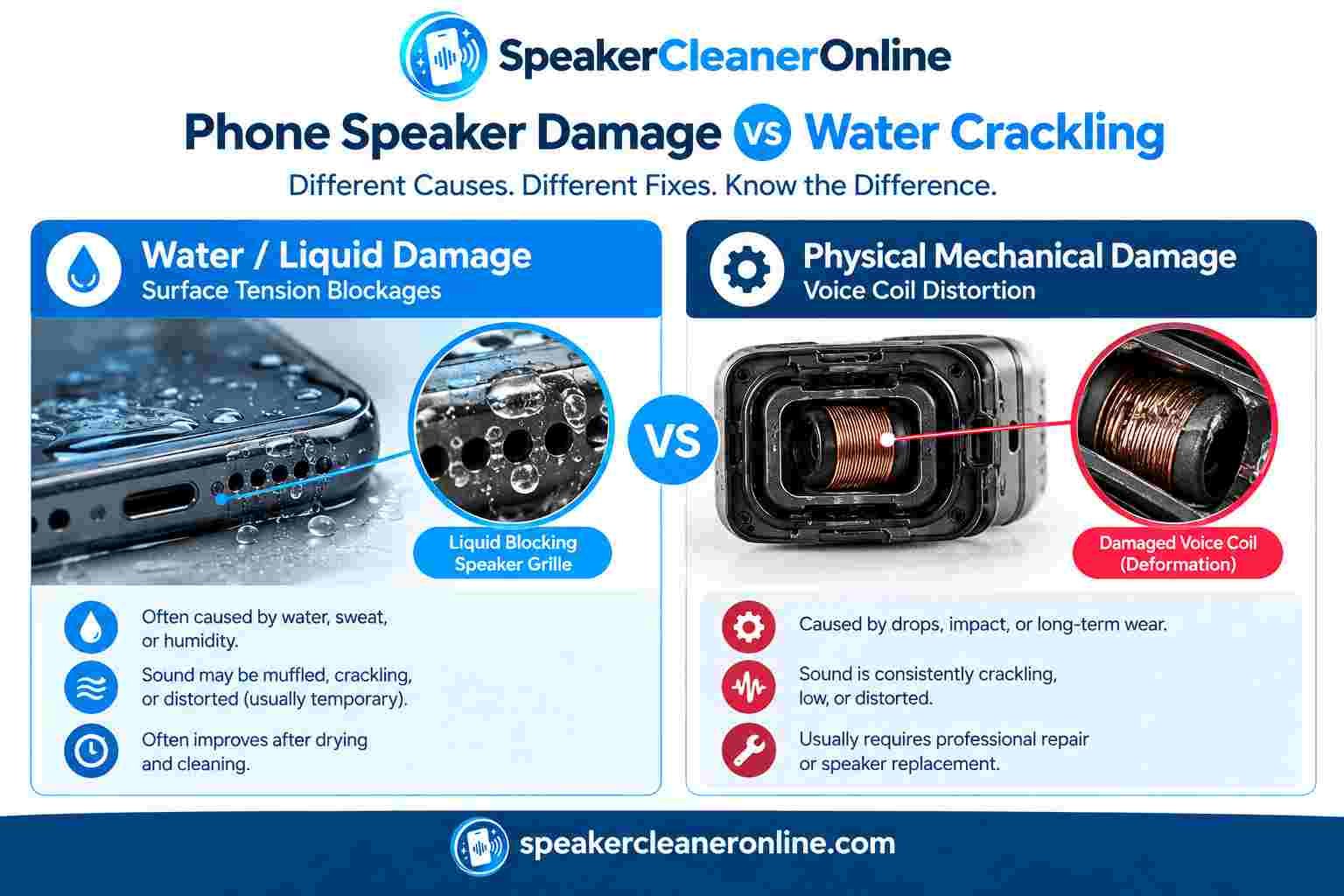
Phone Speaker Crackling After Water vs. Permanent Damage
How do you know if your speaker is simply damp or permanently blown? Compare your device's symptoms against the diagnostic indicators below:
| Observation Factor | More Consistent with Temporary Moisture | Indicative of Hardware / Driver Damage |
|---|---|---|
| Onset of Symptom | Began immediately after swimming, rain, or a water spill. | Began after a hard floor drop or prolonged maximum-volume blasting. |
| Sound Quality Curve | Sounds muffled, bubbling, or slightly muted; voice calls are hollow. | Sounds harsh, metallic, paper-thin, or produces loud buzzing rattles. |
| Volume Behavior | Plays cleanly at 30% volume; crackling only appears as volume pushes water. | Rattles or clips violently even at low or moderate listening levels. |
| Behavior Over Time | Audio gradually clears up over 12–24 hours as room air evaporates moisture. | Crackling remains completely unchanged or worsens after 48 hours. |
| Device Symptoms | Device operates normally; charging port warns of moisture. | Device overheats, battery drains rapidly, or speaker cuts out completely. |
Why Is My iPhone Speaker Crackling?
Modern iPhones (from iPhone 11 through iPhone 16 series) use a hybrid stereo sound system. The bottom-right speaker handles loud low-and-mid frequencies, while the top earpiece receiver handles high-frequency stereo channels and phone calls.
If your iPhone speaker crackles, follow Apple's documented troubleshooting protocol [1]:
- Inspect the receiver and speaker grilles: Check the fine mesh above the front-facing TrueDepth camera and along the bottom edge. Apple advises using a clean, dry, soft-bristled brush to remove lint.
- Check your call audio separately: If crackling occurs only while holding the phone to your ear, Apple notes that carrier network static or poor cellular reception is often the culprit. Switch to speakerphone or FaceTime Audio to test.
- Test Sound Recognition & Safety: Go to Settings > Sounds & Haptics > Headphone Safety and verify volume limiter sliders are not distorting output.
- Run a dedicated model clean: If surface dust is present, explore our specialized iPhone speaker cleaner guide for generation-specific mesh layouts.
Why Is My Android Phone Speaker Crackling?
Because the Android ecosystem spans hundreds of manufacturers—including Samsung, Google Pixel, Motorola, and Xiaomi—audio hardware varies significantly.
Samsung Galaxy Troubleshooting
Samsung recommends opening the Samsung Members app, tapping Support > Diagnostics > Phone diagnostics, and selecting Speaker [2]. The app plays high and low test tones to evaluate both speakers independently. Samsung also advises removing heavy third-party cases that obstruct bottom acoustic chambers. For deep cleaning, see our Samsung speaker cleaning walkthrough.
Google Pixel & Other Androids
Google Pixel devices feature stereo speakers that vent through the bottom port and top speaker slit [3]. Google emphasizes keeping microphone and speaker ports free of pocket lint. If crackling began after rain, review Google's water guidance and run our universal Android speaker cleaner tool.
Crackling vs. Buzzing, Rattling, Static & Popping
Audio terms are often used interchangeably, but distinct acoustic noises point to different physical issues:
| Acoustic Noise | What It Sounds Like | Primary Suspected Cause |
|---|---|---|
| Crackling | Crisp, irregular clicking or snapping like burning wood. | Water droplet film on mesh, digital clipping, or electrical fault. |
| Static | Continuous hissing or white noise in the background. | Cellular network interference, bad streaming source, or Bluetooth DAC desync. |
| Buzzing | Monotone low-frequency electrical drone. | Loose chassis screw, vibrating phone case, or ground loop while charging. |
| Rattling | Harsh mechanical clattering during bass-heavy notes. | Torn speaker surround, loose debris inside port, or blown voice coil. |
| Popping | Sudden loud thump when audio starts, pauses, or stops. | Operating system audio amplifier power-down glitch or failing capacitor. |
How to Perform a Controlled Speaker Diagnostic Test
Never rely on a single YouTube clip or streaming app to judge your speaker's health. Run this simple 5-step diagnostic sequence to evaluate frequency fidelity:
- Test Clean Midrange: Play a spoken-word podcast or audio recording at 50% volume. Human speech occupies 300 Hz to 3,000 Hz; if speech is muddy or crackles, the primary driver is impaired.
- Test Sub-Bass Excursion: Play an 80 Hz test tone or a bass-heavy track. If the speaker buzzes violently only when bass notes hit, the cone suspension is loose or an external case is rattling.
- Test High-Frequency Treble: Play acoustic cymbals or an 8,000 Hz tone. If treble is raspy or silent, the speaker grille mesh is likely clogged with fine dust.
- Isolate Left & Right Channels: Open our browser-based online speaker test to pan audio 100% left and 100% right. This reveals whether distortion is isolated to a single speaker.
- Compare Against Headphones: Connect wired or wireless headphones. If the exact same audio file crackles through headphones, your phone's speaker is 100% fine—the problem lies within the audio app, media file, or operating system DAC.
What NOT to Do When Your Phone Speaker Crackles
When dealing with speaker static or muffled sound, avoid these widespread internet myths that cause permanent hardware failure:
❌ Don't Submerge Your Phone in Rice
Apple explicitly warns that putting an iPhone in a bag of rice can allow small rice particles and fine starch powder to enter port openings, permanently damaging connectors and speaker grilles [1]. Rice absorbs moisture slower than open air and cakes into speaker mesh.
❌ Don't Blast Compressed Air
High-pressure air from aerosol cans easily tears delicate microphone membranes and ruptures the ultra-thin polymer suspension of mobile speakers. It also forces water and dust deeper into internal logic board shields.
❌ Don't Use Hair Dryers or Heat Guns
Concentrated heat softens the waterproof pressure-sensitive adhesives sealing your display and rear glass, destroying factory water resistance. Excessive heat can also induce lithium-ion battery swelling and thermal runaway.
❌ Don't Pour Liquids or Alcohol into the Grille
Never spray rubbing alcohol, cleaning detergents, or water into speaker holes. Liquid dissolves internal acoustic damping foams and corrodes sensitive voice-coil wiring.
When Does Crackling Mean You Need a Hardware Repair?
A browser sound tool or cleaning brush can resolve surface debris and residual moisture, but it cannot fix broken electrical hardware. You should stop troubleshooting and schedule authorized service if:
- Crackling persists across all applications at moderate (30–50%) volume after 48 hours of complete drying.
- The phone was submerged in salt water, chlorinated pool water, or sticky beverages (which causes rapid galvanic corrosion).
- The speaker began crackling immediately following a hard impact onto concrete.
- The speaker produces no sound whatsoever or audio volume drops by over 80%.
- The back of the phone feels unusually hot near the lower speaker housing during playback.
- The speaker produces loud mechanical rattling or vibration even with the phone case removed.
Replacing a phone loudspeaker assembly is a standard, relatively inexpensive repair for certified technicians (often costing between $50 and $110 depending on the model), restoring pristine factory acoustics.
Frequently Asked Questions About Crackling Phone Speakers
Why is my phone speaker crackling?
A phone speaker crackles when physical debris or moisture obstructs the diaphragm, when volume levels exceed the amplifier's limits (clipping), when Bluetooth audio routes improperly, or when the speaker voice coil suffers hardware damage. Test multiple apps at moderate volume to isolate the cause.
Why is my phone speaker crackling after water?
Liquid droplets form a surface-tension film across the speaker grille mesh, muffling sound and creating a crackling or buzzing sound as the diaphragm forces air through the water barrier. Dry the phone thoroughly in ventilated ambient air before playing audio.
How do I fix a crackling phone speaker?
Lower the volume to 50%, disconnect Bluetooth devices, remove protective cases, disable EQ or bass-boost settings, inspect the grille for lint, and restart the phone. If the phone was wet, let it dry completely before running a controlled acoustic test.
Can a water eject sound fix a crackling speaker?
A low-frequency water eject tone can help dislodge loose liquid droplets from the exterior speaker grille by moving the diaphragm. However, it cannot repair torn speaker cones, reverse internal motherboard corrosion, or fix damaged amplifier chips.
Is 165 Hz the best frequency for cleaning a phone speaker?
No single frequency works for all phones. 165 Hz is a popular browser preset that produces strong cone movement, but smartphone speaker drivers, chambers, and resonances vary widely. Dynamic frequency sweeps generally perform more reliably than a single fixed tone.
Why does my phone speaker crackle only at high volume?
Crackling exclusively at high volume typically stems from amplifier clipping, aggressive equalizer bass boost, loose phone cases vibrating, or early voice coil degradation. Reduce volume and test flat EQ settings to confirm.
Why does my iPhone speaker crackle?
On iPhone, crackling often results from debris blocking the lower acoustic ports or earpiece, active Bluetooth routing, or network interference during calls. Apple recommends cleaning dry openings with a clean, dry, soft-bristled brush and testing with case removed [1].
Why does my Android phone speaker crackle?
On Android devices like Samsung Galaxy or Google Pixel, crackling can stem from Dolby Atmos or custom EQ settings, Bluetooth desync, debris in the bottom speaker grille, or water intrusion. Samsung recommends testing via Samsung Members diagnostics [2].
Should I use a speaker cleaner sound if the phone is wet?
Only after following official liquid drying steps. Disconnect all charging cables, wipe the exterior dry, tap the phone port-downward to drain bulk liquid, and allow ambient air drying. Never run continuous loud sounds on an internally flooded phone.
When does crackling mean I need a hardware repair?
You likely need professional repair if crackling persists across all apps at moderate volume after 48 hours of drying, if the phone was dropped, if the speaker rattles mechanically, or if liquid exposure involved salt water or sticky drinks.
Related Audio Testing & Diagnostic Utilities
Speaker Test Online
Isolate left, right, and stereo speaker channels to verify volume balance, frequency response, and audio clarity.
Run Speaker Test →Water Eject Tool
Play calibrated low-frequency sound cycles to help dislodge moisture trapped in smartphone speaker grilles.
Launch Water Eject →Tone Generator
Generate exact sine, square, and triangle frequencies from 20 Hz to 20,000 Hz to detect specific driver buzz points.
Open Tone Generator →iPhone Speaker Cleaner
Acoustic sweeps and Apple-aligned physical cleaning guidance tailored for iPhone speakers and earpieces.
Open iPhone Cleaner →Android Speaker Cleaner
Acoustic driver exercises and safe dust removal procedures for Google Pixel, Xiaomi, and Android phones.
Open Android Cleaner →Samsung Speaker Cleaning
Frequencies and official Samsung care guidelines for Galaxy speaker grilles and receivers.
Open Samsung Guide →Authoritative References & Documentation
This troubleshooting guide has been compiled in strict accordance with the official hardware maintenance protocols published by leading smartphone manufacturers:
- Apple Support: If you see a liquid-detection alert on your iPhone [1] — Official procedures for handling wet iPhone connectors, warning against rice, heat, and foreign objects.
- Apple Support: If you hear no sound or distorted sound from your iPhone speaker — Official guidelines on checking speaker openings and soft-brush maintenance.
- Samsung Support: Speaker or microphone is not working properly on Samsung phone [2] — Instructions on checking volume, Bluetooth routing, and running Samsung Members diagnostics.
- Google Pixel Help: Prevent and handle water damage on your Pixel phone [3] — Room-temperature drying protocols and port care.