
How to Clean Dust from Your Phone Speaker
How to Clean Dust from Your Phone Speaker: Safe Methods That Actually Help
Methodology: This guide separates official manufacturer cleaning instructions from optional supplementary methods (like sound-based cleaners) to provide the safest troubleshooting steps.
If your phone speaker sounds muffled or quiet, dust and pocket lint may be blocking the speaker grille. Start with a clean, dry soft-bristled brush, then test the speaker again.
If loose debris remains, you can also try the free Speaker Cleaner Online tool to help loosen debris with sound — without opening your phone.
Quick Answer: How do I clean dust from my phone speaker?
- Remove the phone case.
- Turn the phone off if practical.
- Inspect the speaker grille.
- Use a clean, dry, soft-bristled brush gently across the grille.
- Wipe loose debris from the phone’s exterior with a lint-free cloth.
- Test the speaker.
- If appropriate, try a short speaker-cleaning sound.
- If the sound remains muffled, investigate water, software, blockage, or hardware damage.
Why Does Dust Get Into Phone Speakers?
Speaker openings must allow air and sound to pass freely, which means they are naturally exposed to the environment. Over time, they can collect debris from everyday use, including:
- Pocket lint
- Clothing fibers
- Household dust
- Sand and fine particles
- Makeup and skin debris
- Outdoor dirt
- Construction or work environment debris
- Dust mixed with moisture or natural oils
What Problems Can Speaker Dust Cause?
When debris blocks the acoustic path of your phone’s speaker, you may experience several frustrating audio issues:
- Muffled sound
- Lower perceived volume
- Weak call audio
- Quiet earpiece
- Distorted or unclear audio
- Crackling caused by debris interfering with the speaker
- Uneven sound from dual speaker setups
Important: A muffled speaker is not automatically a dust problem. Other possible causes include recent water or moisture exposure, misrouted Bluetooth audio, a blocked phone case, software glitches, or actual damaged speaker hardware.
How to Clean Dust from Your Phone Speaker
Step 1 — Remove the case
Phone cases can trap dust and partially cover speaker openings. Always remove your case before diagnosing or cleaning an audio issue to ensure the grille is fully exposed.
Step 2 — Inspect the speaker grille
Use a good light source to look closely at the speaker openings at the bottom of your phone and the receiver/earpiece at the top. Look for visible lint, dust, dirt, or blockage.
Step 3 — Gently brush away dust
Use a clean, dry, soft-bristled brush (like a clean makeup brush or a soft painter’s brush). Apple specifically recommends a small, clean, dry, soft-bristled brush for blocked or dirty speaker openings. Use gentle strokes, apply no force, do not push the bristles deeply into the openings, and never scrape the grille.
Step 4 — Wipe around the speaker
Use a clean, dry, lint-free cloth (like a microfiber lens cloth) to wipe away any loose debris from the phone’s exterior that you just brushed out.
Step 5 — Try the online speaker-cleaning sound
A sound-based cleaner can be used as an optional supplementary method. While physical cleaning removes surface dirt, speaker movement and acoustic vibration may help loosen certain loose debris deeper in the grille. You can clean your phone speaker online using a high-frequency dust sweep. (Note: Sound does not physically blast every particle out, but it can assist in shaking loose dry debris.)
Step 6 — Test the speaker
Play normal audio to check for improvement. Use music, a voice recording, a ringtone, a phone call, or a dedicated speaker test to listen for clarity and volume.
Phone Speaker Cleaning Infographic
Follow this visual guide for a safe, step-by-step cleaning process:
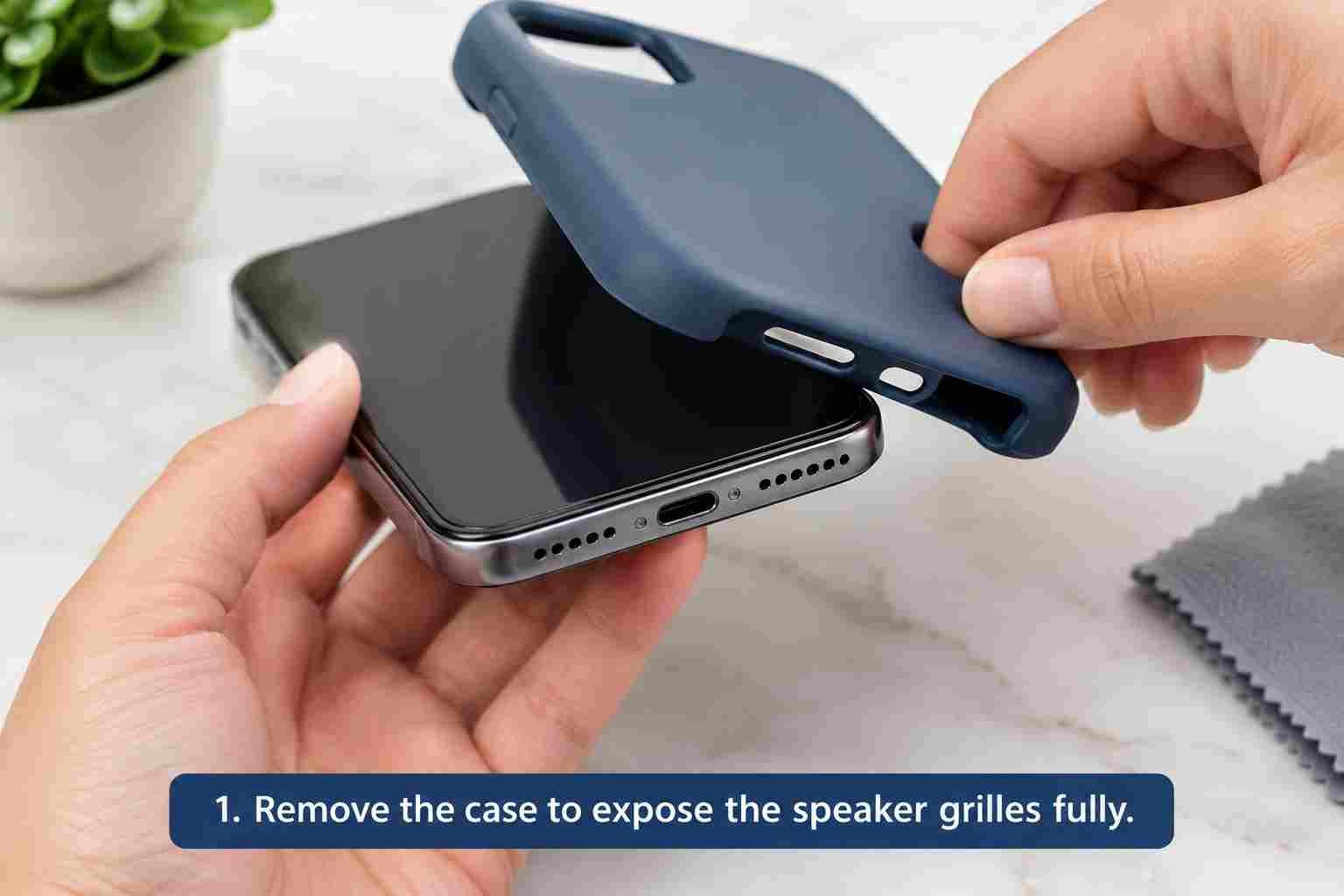
1. Remove the case to expose the speaker grilles fully.
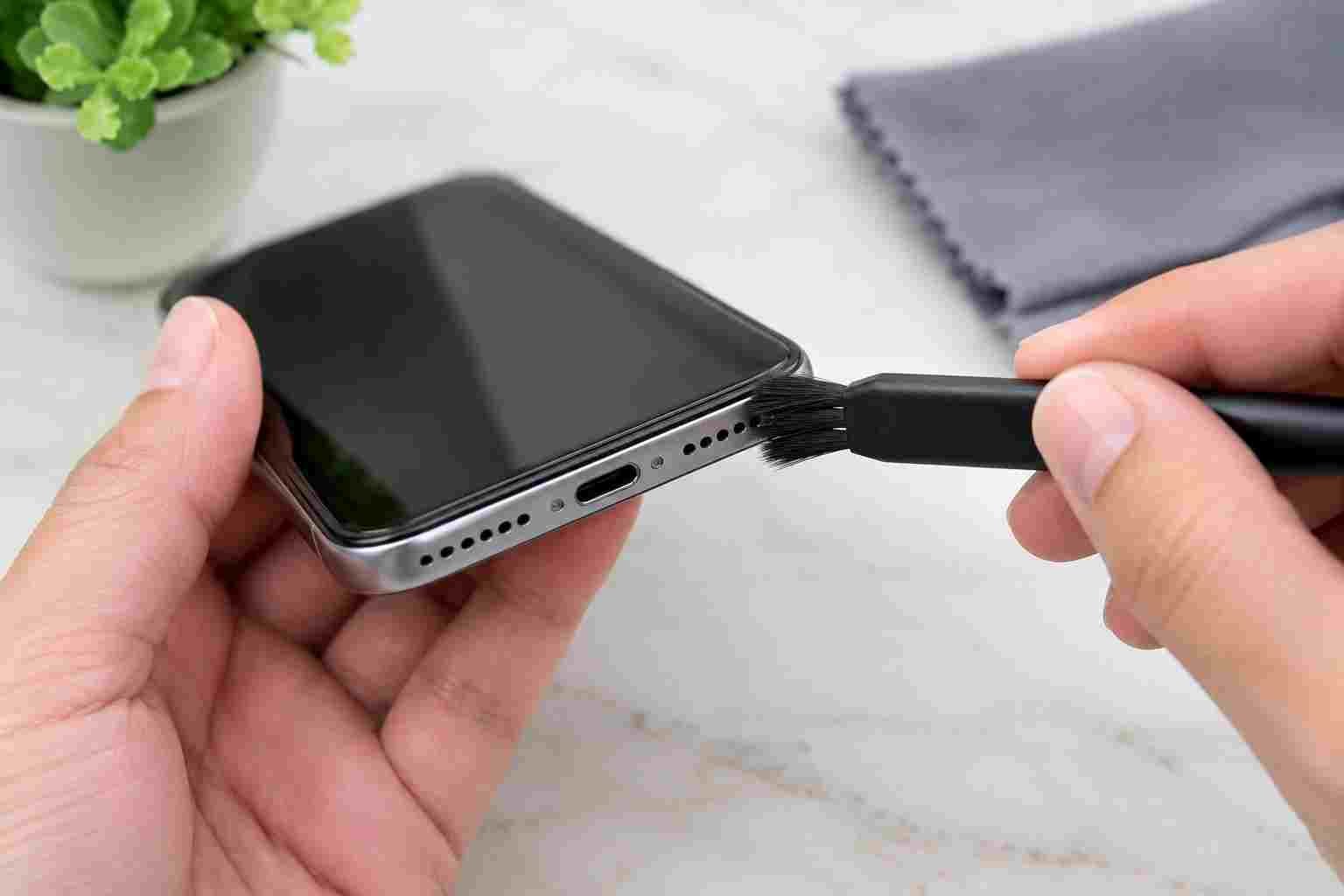
3. Gently sweep the grille with a soft, dry brush.
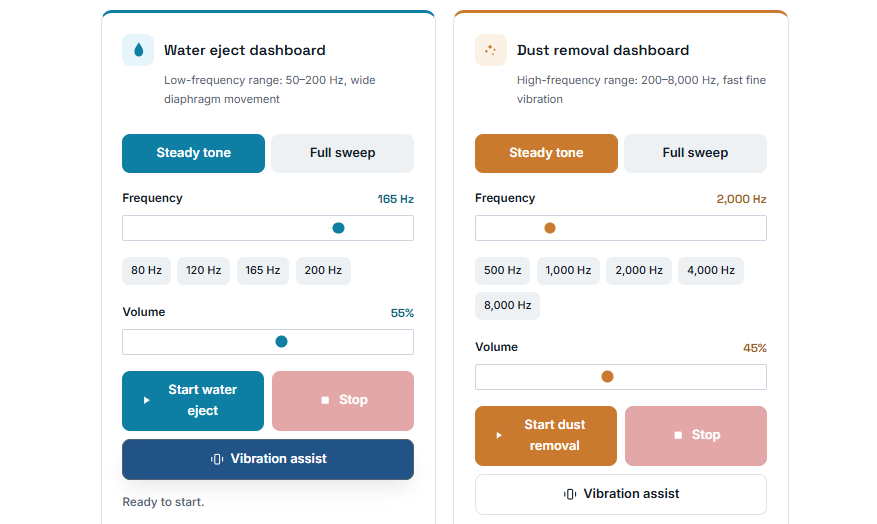
4. Run a speaker cleaning sound to help vibrate loose dust free.
5. Play audio to test if the speaker clarity has returned.
Avoid These Phone Speaker Cleaning Mistakes
Using the wrong tools can permanently puncture your speaker diaphragm or damage water-resistance seals. Avoid using:
- Pins, needles, or paper clips
- Any sharp objects
- Pushing cotton swabs deep into speaker holes
- Liquids directly inside speaker openings
- Aggressive scraping
- Excessive physical force
- Strong compressed-air blasts
Note: For iPhone users, Apple’s current guidelines specifically advise against using compressed air as a general cleaning method. Always follow your specific manufacturer’s instructions.
How to Clean an iPhone Speaker
If your iPhone bottom speaker or top earpiece receiver is sounding muffled, or the volume is suddenly low, it may be blocked. Apple’s recommendation for checking the speaker or receiver opening is to use a small, clean, dry, soft-bristled brush when necessary to clear away debris.
For more detailed information, consult the official guide: Apple Support — If you can’t hear any sound or hear distorted sound from your iPhone.
How to Clean an Android Speaker
Android phones vary heavily by manufacturer and model, meaning a Samsung Galaxy, Google Pixel, OnePlus, Xiaomi, Motorola, Sony, Oppo, or Vivo will all have slightly different speaker grille designs. However, the general safe guidance remains the same:
- Remove the case.
- Inspect the speaker openings.
- Consult manufacturer-approved cleaning instructions for your model.
- Use a clean soft brush when appropriate.
- Avoid sharp objects.
- Test the sound.
- Consider the online speaker cleaner as an optional supplementary method.
Samsung Galaxy Speaker Cleaning
If your Samsung device is experiencing low volume, Samsung recommends gentle cleaning. They explicitly warn against inserting sharp objects and advise against blasting compressed air into the speaker openings in their device-care documentation. Refer to official Samsung Support resources for model-specific care.
Google Pixel Speaker Cleaning
If a Pixel speaker sounds quiet, check the speaker opening first. Remove visible debris gently with a soft brush. If it appears clean but sound is unexpectedly low, check your Bluetooth and audio routing settings. Restart the device and test again. If the speaker remains faulty, seek official Google support.
Other Android Phones
| Phone Brand | What to Check |
|---|---|
| iPhone | Earpiece and bottom speaker grille |
| Samsung Galaxy | Speaker openings and audio settings |
| Google Pixel | Speaker grille, Bluetooth and software |
| OnePlus | Speaker grille and audio output |
| Xiaomi | Speaker openings and audio settings |
| Motorola | Speaker grille and sound settings |
| Sony Xperia | Speaker openings and device-specific cleaning guidance |
| Oppo | Speaker openings and manufacturer guidance |
| Vivo | Speaker openings and manufacturer guidance |
Is It Dust or Water in My Phone Speaker?
Treating dust is different from treating water. Knowing which problem you have is critical to fixing the sound.
Dust is more likely when:
- The problem developed gradually over time.
- The phone has been frequently kept in a pocket or bag.
- You can visibly see lint or dust in the grille.
- There was no recent water exposure.
Water is more likely when:
- The problem started immediately after liquid exposure.
- Audio suddenly became muffled or crackly.
- You can visibly see moisture inside the openings.
- The phone was recently dropped in water, exposed to rain, or splashed.
If you suspect water, drying is the most important step. You can also use our Water Eject / Speaker Cleaner tool. Remember that a speaker-cleaning sound is not a substitute for proper liquid-damage drying procedures.
Can Sound Remove Dust from a Phone Speaker?
Speakers create mechanical movement when producing sound. Because of this, a sound-based cleaner may help loosen some loose, dry debris from the speaker mesh. However, it is not a guaranteed replacement for physical cleaning, nor can it remove deeply compacted dirt or repair damaged hardware. Results will always vary based on your phone’s design and the type of debris.
Does a 165 Hz Speaker Cleaner Remove Dust?
165 Hz simply means the audio tone is cycling 165 times per second. While 165 Hz is a popular low-frequency tone that creates wide speaker movement (often used for water), frequency alone does not guarantee dust removal. Different phones have different speaker designs, so you should treat frequency-based cleaning as an optional troubleshooting method rather than a guaranteed scientific solution.
Phone Speaker Still Sounds Muffled?
| Problem | What to Try |
|---|---|
| Speaker sounds muffled | Inspect grille and gently clean with a soft brush |
| Speaker is very quiet | Check volume settings, Bluetooth, and grille blockage |
| Earpiece is quiet | Inspect the top receiver grille specifically |
| Speaker crackles | Test after cleaning; persistent crackling may indicate hardware/software issues |
| Speaker got wet | Stop charging, dry properly and follow manufacturer guidance |
| Sound only works through headphones | Check Bluetooth/audio output settings |
| One speaker is quieter | Test both speaker locations (some phones only have one bottom speaker despite two grilles) |
| Cleaning did not help | Consider deeper blockage, a software issue, or hardware damage |
| No sound at all | Troubleshoot device settings and seek manufacturer support if needed |
When Should You Stop Cleaning and Get Help?
Do not attempt aggressive DIY cleaning if the initial gentle steps do not work. Seek professional or manufacturer support if:
- The speaker remains completely silent.
- Severe crackling continues across all apps and audio types.
- The sound became distorted immediately after a physical impact or drop.
- The phone was exposed to liquid and symptoms persist after a day of drying.
- The speaker grille is physically damaged, dented, or punctured.
- Repeated cleaning attempts do not improve the problem.
How to Prevent Speaker Dust
- Keep your pockets free of heavy lint.
- Avoid storing the phone face-down in dusty or sandy environments.
- Clean the exterior of your phone regularly.
- Use a suitable phone case that helps shield ports without blocking audio.
- Do not place the phone directly on dirty or dusty workshop surfaces.
- Inspect speaker openings occasionally and gently brush them before dirt compacts.
- Always follow the manufacturer’s cleaning instructions.
Related Questions
How do I clean dust out of my phone speaker?
Start by removing your case and gently sweeping a clean, dry, soft-bristled brush across the speaker grille to remove loose debris.
How do I clean my phone speaker without opening it?
You should never open your phone for routine cleaning. Use a soft exterior brush and optional sound-based vibration tools to loosen debris from the outside.
How do I clean my phone speaker grille?
Use a soft, dry makeup or painter’s brush. Wipe away the dislodged dirt with a lint-free microfiber cloth.
How do I remove lint from my phone speaker?
If lint is visible at the surface, gently tease it out with a soft brush. Avoid using pins or needles, which can push lint deeper or puncture the speaker.
Why does my phone speaker sound muffled?
Muffled sound is usually caused by dust/lint blockage, recent water exposure, or a phone case covering the speaker grilles.
Why is my phone speaker so quiet?
It could be blocked by debris, your volume settings might be lowered, or your phone may be routing audio to a connected Bluetooth device.
Can I clean my phone speaker with a toothbrush?
While some people use a very soft, clean, dry toothbrush, a softer brush (like a clean makeup brush) is generally safer and less likely to scratch or push debris deeper.
Can I use a cotton swab on my phone speaker?
It is generally not recommended to push cotton swabs into small speaker holes, as they can leave cotton fibers behind and compact existing dirt.
Can compressed air clean a phone speaker?
Most major manufacturers, including Apple and Samsung, explicitly warn against using compressed air, as the pressure can damage the delicate internal speaker components and water seals.
Does speaker cleaner actually work?
Audio-based speaker cleaners can successfully vibrate loose water and light dust out of the grille, but they cannot fix hardware damage or remove sticky, compacted dirt.
How do I remove water from a phone speaker?
Wipe the phone dry, tap it gently with the connector facing down, let it air dry, and use a water eject sound as a supplementary aid.
Why does my speaker crackle after cleaning?
If crackling persists after cleaning, you may have pushed dirt deeper, there may still be moisture inside, or the speaker driver itself is physically damaged.
Helpful Manufacturer Resources
- Apple Support: If you hear no sound or distorted sound from your iPhone, iPad, or iPod touch
- Samsung Support: Audio issues on your Galaxy phone or tablet
- Google Pixel Help: Fix sound problems on your Pixel phone
Speaker still sounds muffled?
Start with the simple physical cleaning steps above. If you want to try a sound-based cleaning method to help vibrate loose debris, use our free tool and test your speaker again.
Open Speaker Cleaner Online